Friday, April 24, 2020

Module - Patient Details

 Within an Emergency Department, there is nothing that generates more difficulty and issues, then when a patient arrives without ID and is unable to communicate - A John / Jane Doe.

Especially if the patient is badly injured or has suffered a major trauma, missing information can delay essential treatment, while critical data is freshly obtained i.e. blood type etc.

PatientManager stores very detailed information on each patient including photo ID, personal information, personal carers / NOK, Insurance, GP. Every field is searchable singularly or as part of a group.This means over 40 different searchable field to identify or confirm the identity of the patient. This makes positive identification highly probable and greatly lowers the risk of the patient being a John / Jane Doe. A large comments field can be also used to add additional searchable data, such as an identifiable birth mark, scars etc.
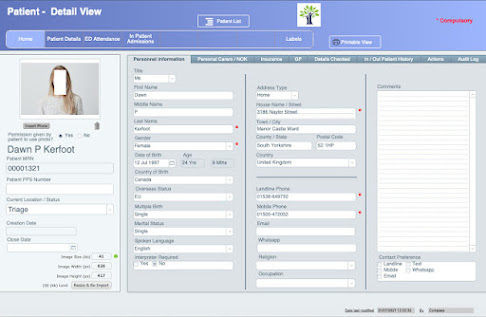


 Within this module there will also be access to full In / Out patient history, an audit log tracking all data changes and an 'actions' tab for access to additional tasks such as printing labels etc.

If you are a medical consultant working for an Emergency Trauma Hospital or know of another consultant or hospital who would like to collaborate with us (CompassAFM) on the development of PatientManager, please contact us at info@compasspatientmanager.com
We would love to hear from you.
Dominic Murnane

MD Compass AFM 


PatientManager® and its logo is a registered trademark and owned by Compass Software Technology Limited (T/A CompassAFM). All product images are protected by copyright© (2019 -2021) and may not be used without the written permission of the owner - Compass Software Technology Limited. All rights reserved.

Tuesday, March 31, 2020

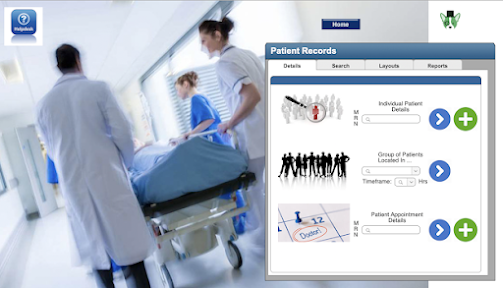
Module Home Pages

 Each module's homepage (layout) will have a common visual theme. 


 Split over 4 tabs;

  • Details - 'Instant' tools to access the most common required info or tasks
  • Search - Search all records within layout with most common search fields
  • Layouts - Navigation within module
  • Reports - Multiple built-in ready to use reports.


If you are a medical consultant working for an Emergency Trauma Hospital or know of another consultant or hospital who would like to collaborate with us (CompassAFM) on the development of PatientManager, please contact us at info@compasspatientmanager.com
We would love to hear from you.
Dominic Murnane
MD Compass AFM 


PatientManager® and its logo is a registered trademark and owned by Compass Software Technology Limited (T/A CompassAFM). All product images are protected by copyright© (2019 -2021) and may not be used without the written permission of the owner - Compass Software Technology Limited. All rights reserved.

Monday, March 16, 2020

Set Up Layout

This is the main administrative area of PatientManager. This gives an "Admin" level user to make comprehensive changes across the database without needing assistance from CompassAFM. For example:

  • All drop-down menus can be modified.
  • Data lists can be modified
  • It allows users to be added or removed from the database.


PatientManager allows for unlimited creation of data lists, working with CompassAFM, creation of new lists can potentially be completed in just a couple of hours. Once created all new data entry or modifications can be easily carried out by the appointed hospital database administrator(s)


Similarly, it will be very easy to add or remove users. There will be multiple levels of access dependant on the users role within the hospital.


If you are a medical consultant working for an Emergency Trauma Hospital or know of another consultant or hospital who would like to collaborate with us (CompassAFM) on the development of PatientManager, please contact us at info@compasspatientmanager.com
We would love to hear from you.
Dominic Murnane
MD Compass AFM 


PatientManager® and its logo is a registered trademark and owned by Compass Software Technology Limited (T/A CompassAFM). All product images are protected by copyright© (2019 -2021) and may not be used without the written permission of the owner - Compass Software Technology Limited. All rights reserved.

Wednesday, March 4, 2020

The Home Layout

 Well over the last couple of weeks we have been experimenting with various ideas for a home layout and this is where for the meantime what we will use...


The idea is that it is a 'welcome' personalised to the user and with quick access to the main modules. So let's go through the design.

  • The Hospital graphic can be replaced by any image the user (hospital) desires.
  • The tree logo again can be replaced by the hospital logo
  • Personal greeting to the user.

  • On the right there will are links to 6 modules;
    • Patient Details: Comprehensive details on the patient including personal information, In & Out patient history.
    • GP Referral: This will allow a GP (General Practitioner) to provide in advance to the hospital, patient health & medication details, treatment carried out, images (inc ECG & X-Rays), Hand drawn sketch. As well as advising of imminent attendance of the patient to hospital ED.
    • ED Attendance: Tracking of patient on arrival to ED, Triage, Generation of new ED Chart and access to all historical charts. Generation of ED Status board, Admission of patient to Ward.
    • Paramedic Callout: Ability for paramedics to transfer data to ED on patient condition while on route to ED.
    • Out Patient Appointments: Allows the generation of appointments from various clinics and capture of patient care data from appointment.
    • In Patient Admissions: Admission of patient to ward, and capture of all patient care data while and in-patient. Bed management and billing functions.

  • On the bottom there are links to 4 functions;
    • Set Up: To setup hospital information, Administrative Data Lists (consultants, patient locations, insurance companies etc.), Medical Data Lists (Triage Trauma Categories, Blood Test Categories etc.).
    • Help: Access to full online help and tutorials.
    • Mobile Access: Layouts designed to work with mobile devices & tablets.
    • Scanning: Ability to scan both bar & QR codes.

  • Also not shown on image, full drop down navigation available from every layout, allowing you to easily navigate through PatientManager with a single click.


If you are a medical consultant working for an Emergency Trauma Hospital or know of another consultant or hospital who would like to collaborate with us (CompassAFM) on the development of PatientManager, please contact us at info@compasspatientmanager.com
We would love to hear from you.
Dominic Murnane
MD Compass AFM 


PatientManager® and its logo is a registered trademark and owned by Compass Software Technology Limited (T/A CompassAFM). All product images are protected by copyright© (2019 -2021) and may not be used without the written permission of the owner - Compass Software Technology Limited. All rights reserved.

Thursday, February 13, 2020

Design Theme


When designing the theme for PatientManager, we are going to start with ideas that we know work and have received very good feedback in the past.

If you expect PatientManager to have the typical database grey background or look like an upgraded spreadsheet, well that will not be the case. 


Colours will be bright and changing dependant on module and type of layout. 


This is a screenshot from our current FacilityManager solution.

All corners are rounded, as this has been proven to reduce both eye tiredness and improve alertness and efficiency. Fonts will be contrasted against the background colour to make them easier to read. There will be multiple means of navigation so finding the required layout should at most be only 1 or 2 clicks.

The various modules will be like chapters in a book, with a distinct homepage for each, from where you will be easily able to access the related layouts, perform searches or generate reports.

The concept of the theme will be 'easy on the eye' and easy to use'.


If you are a medical consultant working for an Emergency Trauma Hospital or know of another consultant or hospital who would like to collaborate with us (CompassAFM) on the development of PatientManager, please contact us at info@compasspatientmanager.com
We would love to hear from you.
Dominic Murnane
MD Compass AFM 


PatientManager® and its logo is a registered trademark and owned by Compass Software Technology Limited (T/A CompassAFM). All product images are protected by copyright© (2019 -2021) and may not be used without the written permission of the owner - Compass Software Technology Limited. All rights reserved.


Tuesday, February 11, 2020

Getting Started

So lets get PatientManager started...

Over the past weeks we have been reviewing what layouts, scripts, concepts etc., that already exist in our other database (FacilityManager) that we could reuse or modify to facilitate a faster build time. In fact we found quite a few. The technical (in the broadest meaning of the word) similarities between maintaining the health of plant and equipment and maintaining the health of a patient do have similarities. For example;

  • Checking a patient into the Emergency Department  -> Logging a piece of equipment for repair
  • Assigning a consultant to a patient -> Assigning an engineer to carry out the repair
  • Booking a bed for a patient -> Booking a parking space for a staff member.
So you can see a trend here.

It is time to start building to see what can be accomplished easily and what will take more time and insight. Over the next few posts we will looking at:

  1. Choosing a design theme and building a homepage layout
  2. Building a 'Setup' Layout
  3. Setting up client modifiable data fields and lists
  4. Creating a patient information record.


If you are a medical consultant working for an Emergency Trauma Hospital or know of another consultant or hospital who would like to collaborate with us (CompassAFM) on the development of PatientManager, please contact us at info@compasspatientmanager.com
We would love to hear from you.
Dominic Murnane

MD Compass AFM 


PatientManager® and its logo is a registered trademark and owned by Compass Software Technology Limited (T/A CompassAFM). All product images are protected by copyright© (2019 -2021) and may not be used without the written permission of the owner - Compass Software Technology Limited. All rights reserved.


Tuesday, December 10, 2019

Building a Plan (Implementation) - Part 3


 Implementation of the PatientManager database will take time and will be individual to each hospital. The individuality will be one of the great benefits offered by PatientManager. We will be using the FileMaker database engine which will allow us to do this. For the hospital this means;

Implementation is a team effort involving all parties from consultants to administrative staff and input from all is the most valuable tool in the development of PatientManager.

  • A generic PatientManager database that can be tailored to their own requirements.
  • The hospital will not have to adapt its patient care and work practices to match fixed software requirements / restrictions.
  • No downtime while modifications are implemented 
  • Many modifications can be carried out in minutes / or a few hours.
  • Live consultation as modifications are being carried out.
PatientManager will have to run alongside whatever system is being currently used for many months to ensure it performs faultlessly to ensure patient safety. This for a period will require additional administrative manpower to operate both systems but will be essential.

During this period, certain modifications will be definitely required or discovered. Again this will fit with our policy of continuous improvement.

If you are a medical consultant working for an Emergency Trauma Hospital or know of another consultant or hospital who would like to collaborate with us (CompassAFM) on the development of PatientManager, please contact us at info@compasspatientmanager.com
We would love to hear from you.
Dominic Murnane
MD Compass AFM 


PatientManager® and its logo is a registered trademark and owned by Compass Software Technology Limited (T/A CompassAFM). All product images are protected by copyright© (2019 -2021) and may not be used without the written permission of the owner - Compass Software Technology Limited. All rights reserved.